Publish a public catalog with OpenCatalogi
Take your OpenRegister Pet Store public without writing a line of code. You scope a catalog to your register, learn exactly how OpenCatalogi decides what an anonymous visitor may see (an OpenRegister RBAC rule that grants the public group read only when a publication date is in the past), publish nine pets while keeping one future-dated pet hidden, verify the rule from a genuinely logged-out browser against the public publications API, and expose the catalog as a DCAT-AP-NL feed that national open-data harvesters can read. Pet Store domain, with UI, API and PHP tabs throughout.

OpenCatalogi is the publishing layer for Conduction apps. Where OpenRegister stores your data and Integriq fills it from elsewhere, OpenCatalogi turns a register you own into a public, browsable, harvestable catalog: a set of API endpoints that anyone on the internet can read, and a DCAT-AP-NL feed that national portals like data.overheid.nl and data.europa.eu can harvest. It does this without a "publish" button and without copying your data anywhere — publishing is a rule on the data, enforced by OpenRegister, and a catalog is just a filter that says which data belongs in the shop window.
This tutorial takes the Pet Store register you built in the first two parts and makes it public. You scope a catalog to the register, set up the visibility rule, publish nine pets while deliberately keeping one hidden, prove the rule from a logged-out browser, and expose the whole thing as a DCAT-AP-NL feed. No code, no second server, no export.
You are at the end of a full data pipeline, all in the Pet Store domain:
- Model your data with OpenRegister — design the schemas and store records.
- Pull external data in with Integriq — feed the register from an external API on a schedule.
- OpenCatalogi (you are here) — expose the register as an open, harvestable catalog.
Each tutorial stands on its own, but together they take a record from "modelled" to "public". This part assumes the petstore-academy register and its pet-academy schema from Part 1, with some pets in it; if you do not have them, run Part 1 first.
Most steps below have three tabs — UI, API, and PHP — so you can follow the click-path, automate it with curl, or call the OCA\ services in code. The UI is the star; the public read endpoints are naturally shown as curl and as URLs you open in a browser.
How publishing works in OpenCatalogi
OpenCatalogi has no separate "publish" button, and that is the single most important thing to understand before you click anything. Visibility is not a flag on a page or a menu you hide — it is a rule on the data itself, enforced by OpenRegister on every request, whatever app or API the reader comes through.
Three things must all be true for an anonymous visitor to see one of your pets:
- The pet lives in a register and schema that a catalog points at. A catalog is a filter: it names the registers and schemas whose objects belong in it. An empty catalog scope serves nothing.
- The pet's schema grants the
publicgroup read — conditionally. This build's rule, taken straight from the live schema, is: thepublicgroup may read an object when itspublicatiedatumis set and is at or before now. That condition is the publish gate. No date, or a future date, means no public read. - The visitor reads it through a public endpoint like
/api/publications(per catalog) or/api/dcat(the harvest feed).
The next steps set up all three conditions and then prove them from a logged-out browser.
Step 1: Scope a catalog to your register
OpenCatalogi ships one catalog with the slug publications. A catalog is an OpenRegister object (it lives in OpenCatalogi's own register, under a catalog schema), and its two most important fields are registers and schemas — the scope. Point them at your Pet Store.
- UI
- API
- PHP
Open OpenCatalogi from the Nextcloud app menu, then Catalogue → Catalogs, and open the Publications catalog. Because a catalog is just an OpenRegister object, you set its scope the same way you edit any object: set Registers to your Pet Store register and Schemas to the Pet schema, and save. From now on the catalog "contains" exactly the pets in that register and schema — nothing else.
Host http://localhost:8080, basic auth admin:admin, and the header OCS-APIRequest: true on every call. The catalog is an OpenRegister object, so you scope it by patching its registers and schemas fields. (Here the OpenCatalogi register that holds catalogs is id 14, the catalog schema is id 54, and the publications catalog object is the one shown; your ids may differ — read them from /api/catalogi first.)
# Read the catalog, find its register/schema/uuid
curl -s "http://localhost:8080/index.php/apps/opencatalogi/api/catalogi"

# Scope it to the Pet Store register (2414) and the Pet schema (4318)
curl -u admin:admin -X PATCH \
  "http://localhost:8080/index.php/apps/openregister/api/objects/14/54/<CATALOG_UUID>" \
  -H "OCS-APIRequest: true" -H "Content-Type: application/json" \
  -d '{ "registers": ["2414"], "schemas": ["4318"] }'
A catalog is an ordinary OpenRegister object, so you scope it through the ObjectService:
use OCA\OpenRegister\Service\ObjectService;

$objects = \OCP\Server::get(ObjectService::class);

$objects->saveObject(
    object: [
        'registers' => ['2414'], // petstore-academy
        'schemas'   => ['4318'], // pet-academy
    ],
    register: '14', // OpenCatalogi's catalog register
    schema:   '54', // the catalog schema
    uuid:     '<CATALOG_UUID>',
);
The catalog now knows which objects belong to it. Read it back and you can see the scope on the record itself:
![The publications catalog returned by the OpenCatalogi catalogi API, pretty-printed: title 'Publications', slug 'publications', listed true, registers ['2414'] and schemas ['4318'], status stable, with a @self envelope showing register 14 and schema 54](/nl/assets/images/01-catalog-scope-015897974028855352fd35b5b76245f6.png)
publications catalog, scoped to the Pet Store. Its registers (2414) and schemas (4318) are the filter; the catalog itself is an OpenRegister object (it lives in register 14, schema 54).Verify: /api/catalogi lists the publications catalog with registers and schemas pointing at your Pet Store register and Pet schema.
Step 2: Publish the pets
Now make the pets readable by an anonymous visitor. Remember the rule: the schema must grant the public group read, gated on a publicatiedatum that is at or before now. So there are two parts — set the rule on the schema (once), then set the date on each pet you want live.
Set the visibility rule on the schema
Open the pet-academy schema in OpenRegister and go to its Security tab. This is the role-based access-control matrix: per Nextcloud group, you grant Create/Read/Update/Delete, where public represents unauthenticated access and admin always keeps full access.
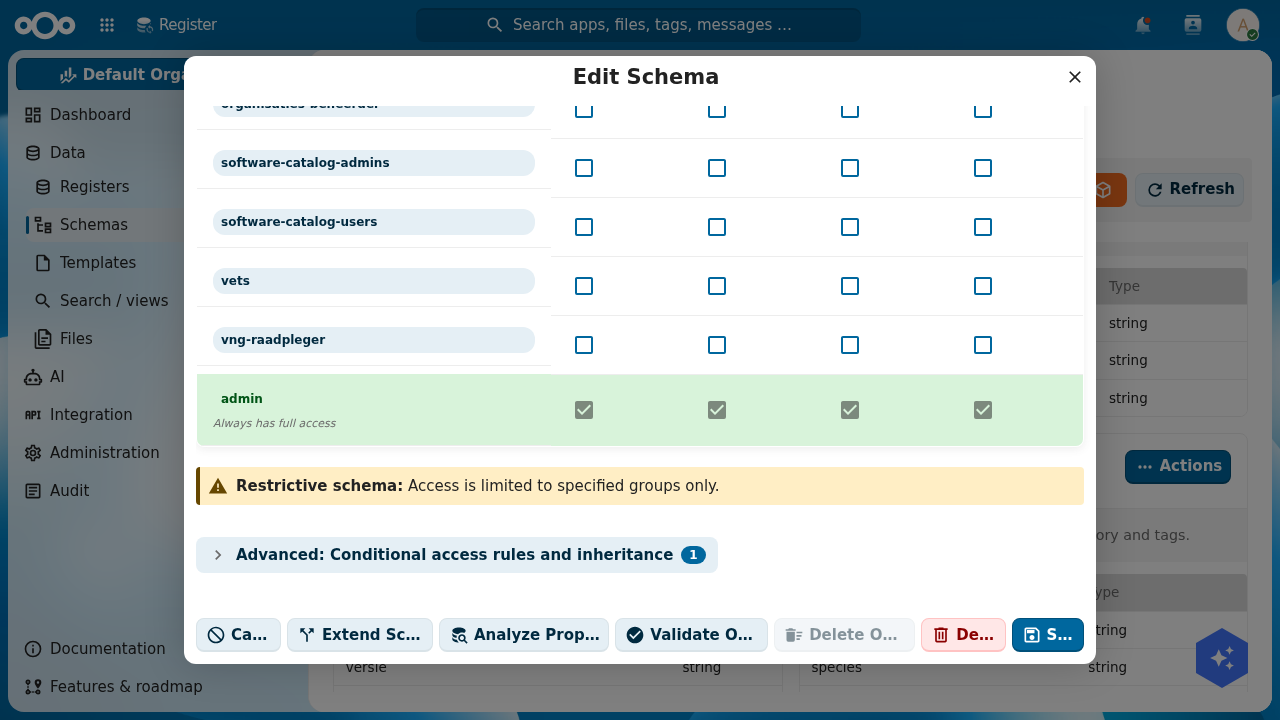
1 is our one conditional read rule.The publish gate is not a simple checkbox — it is a conditional read rule. Expand Advanced: Conditional access rules and inheritance and, under Read, add a rule for the public group with one condition: property publicatiedatum, operator ≤ Less than or equal, value $now. (You add a publicatiedatum date property to the schema first, on the Properties tab, if it does not have one — this build's pet schema didn't, so we added it.)
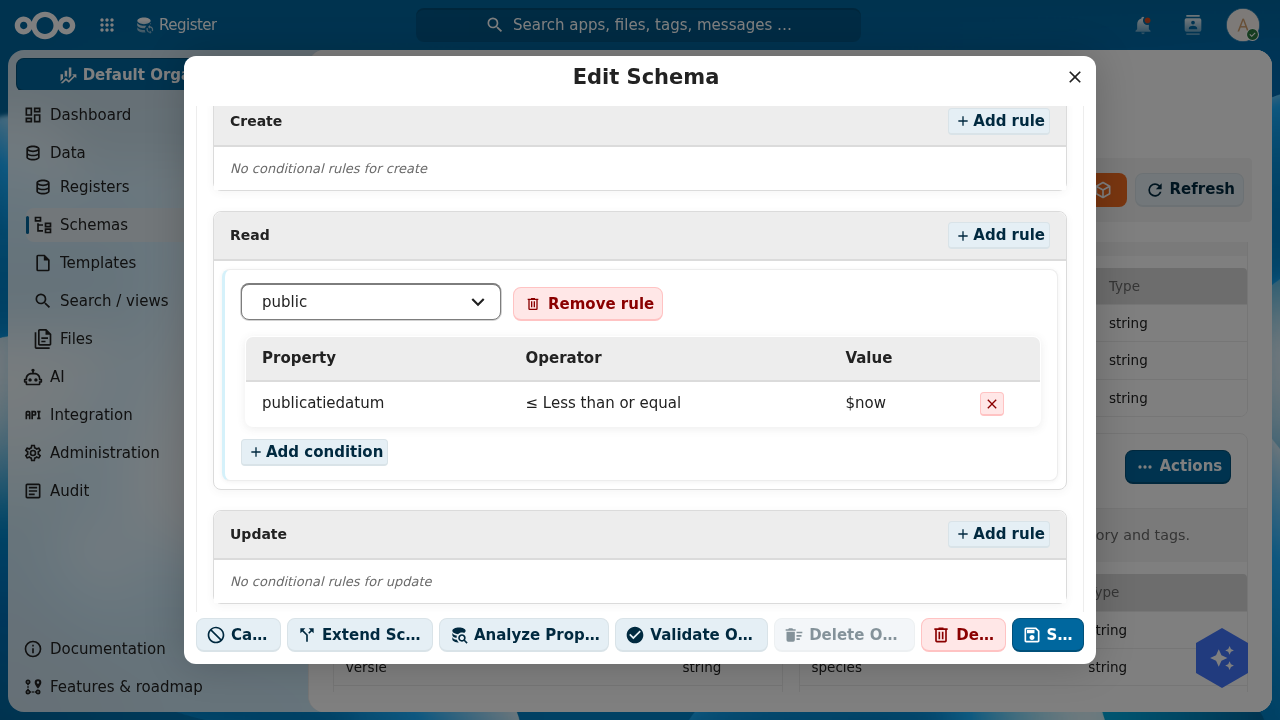
publicatiedatum ≤ $now. This is exactly the rule OpenRegister evaluates in SQL on the public endpoint — there is no other "published" flag.- UI
- API
- PHP
On the Pet schema's Properties tab, add a publicatiedatum property (type string; this build keeps it a plain date-time string so the rule can compare it). Then on the Security tab, under Advanced → Read, add the public rule with the publicatiedatum ≤ $now condition shown above, and save. Leave "Authenticated users inherit public group rights" on (the default) so logged-in staff keep reading their pets normally; anonymous visitors are gated by the date either way.
The rule is one authorization.read entry on the schema. A PUT replaces the schema; keep its existing properties and add publicatiedatum plus the authorization block:
curl -u admin:admin -X PUT \
  "http://localhost:8080/index.php/apps/openregister/api/schemas/4318" \
  -H "OCS-APIRequest: true" -H "Content-Type: application/json" \
  -d '{
        "title": "Pet",
        "slug": "pet-academy",
        "properties": {
          "name": {"type":"string"}, "species": {"type":"string"},
          "status": {"type":"string"},
          "publicatiedatum": {"type":"string","title":"publicatiedatum",
            "description":"Publication date (YYYY-MM-DD HH:MM:SS). Controls public visibility."}
        },
        "authorization": {
          "read": [
            { "group": "public", "match": { "publicatiedatum": { "$lte": "$now" } } },
            "authenticated"
          ]
        }
      }'
use OCA\OpenRegister\Db\SchemaMapper;

$schemas = \OCP\Server::get(SchemaMapper::class);
$pet     = $schemas->find(4318);

// Add the publish-date property.
$pet->setProperties(array_merge($pet->getProperties(), [
    'publicatiedatum' => ['type' => 'string', 'title' => 'publicatiedatum'],
]));

// Grant the public group read, gated on the publish date being in the past.
$pet->setAuthorization([
    'read' => [
        ['group' => 'public', 'match' => ['publicatiedatum' => ['$lte' => '$now']]],
        'authenticated',
    ],
]);

$schemas->update($pet);
Set the date on each pet
The rule is armed; now decide which pets are live. Give the pets you want public a publicatiedatum in the past, and leave one with a publicatiedatum in the future to prove the gate hides it.
- UI
- API
- PHP
Open each pet in OpenRegister (or in the Pet Store app) and set its publicatiedatum to a date in the past, for example 2026-06-01 00:00:00. Save. For one pet — say the pending Spike — set publicatiedatum to a date in the future, for example 2099-01-01 00:00:00. That pet stays a draft, invisible to the public, until the date arrives.
Patch each pet's publicatiedatum:
# Publish a pet (date in the past → public)
curl -u admin:admin -X PATCH \
  "http://localhost:8080/index.php/apps/openregister/api/objects/2414/4318/<PET_UUID>" \
  -H "OCS-APIRequest: true" -H "Content-Type: application/json" \
  -d '{ "publicatiedatum": "2026-06-01 00:00:00" }'

# Keep one hidden (date in the future → private)
curl -u admin:admin -X PATCH \
  "http://localhost:8080/index.php/apps/openregister/api/objects/2414/4318/<SPIKE_UUID>" \
  -H "OCS-APIRequest: true" -H "Content-Type: application/json" \
  -d '{ "publicatiedatum": "2099-01-01 00:00:00" }'
use OCA\OpenRegister\Service\ObjectService;

$objects = \OCP\Server::get(ObjectService::class);

// Publish (past date).
$objects->saveObject(
    object: ['publicatiedatum' => '2026-06-01 00:00:00'],
    register: 'petstore-academy', schema: 'pet-academy', uuid: $petUuid,
);

// Keep hidden (future date).
$objects->saveObject(
    object: ['publicatiedatum' => '2099-01-01 00:00:00'],
    register: 'petstore-academy', schema: 'pet-academy', uuid: $spikeUuid,
);
OpenCatalogi's own dashboard reads this state directly. With nine pets dated in the past and one in the future, it shows 10 publications, 9 published, 1 concept — the concept being the future-dated pet that is not yet public:
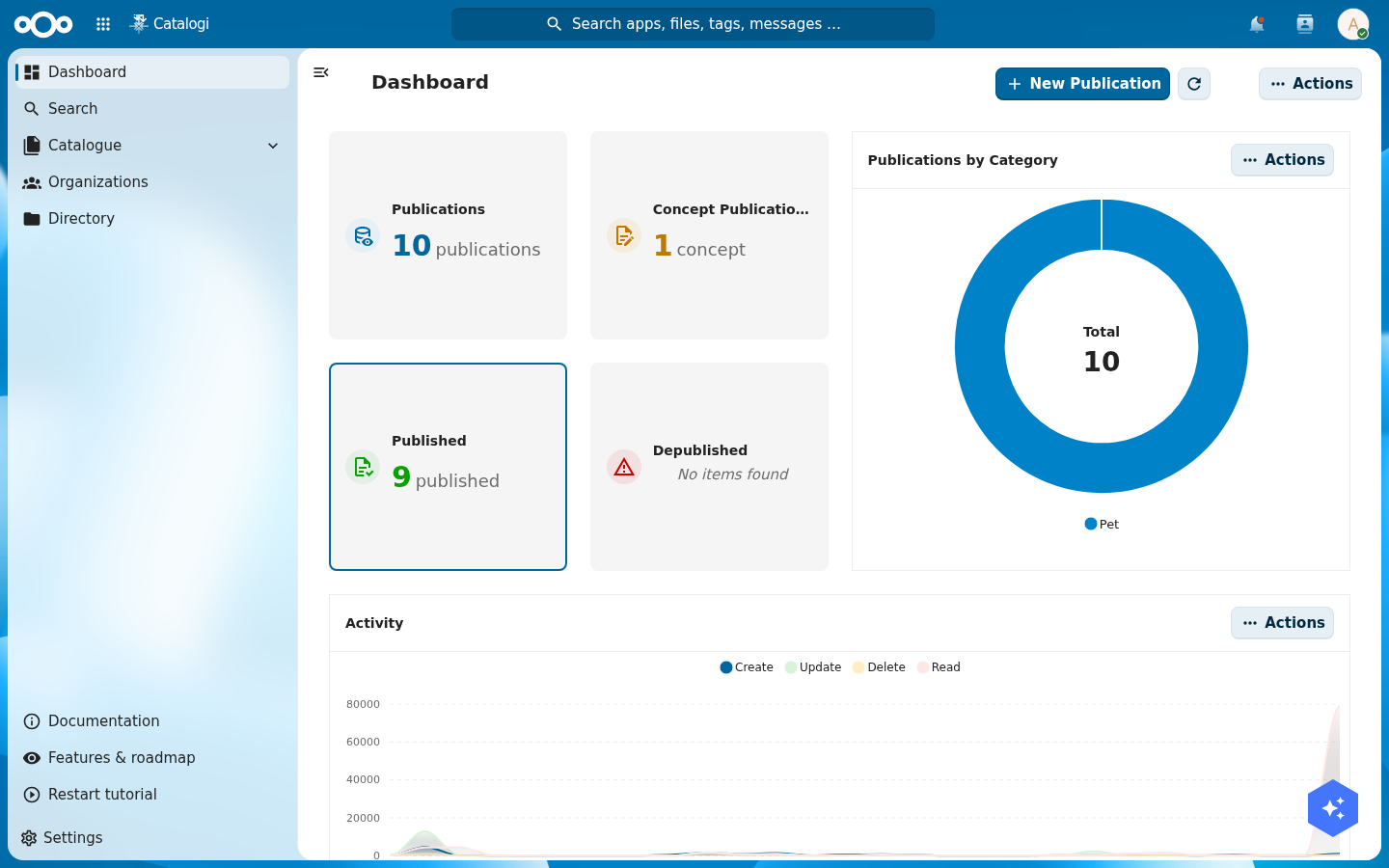
publicatiedatum the public rule checks.Scroll the dashboard and the breakdown is by name: the published pets carry a green Published badge, while the future-dated Spike sits under Concept, exactly as the rule dictates.
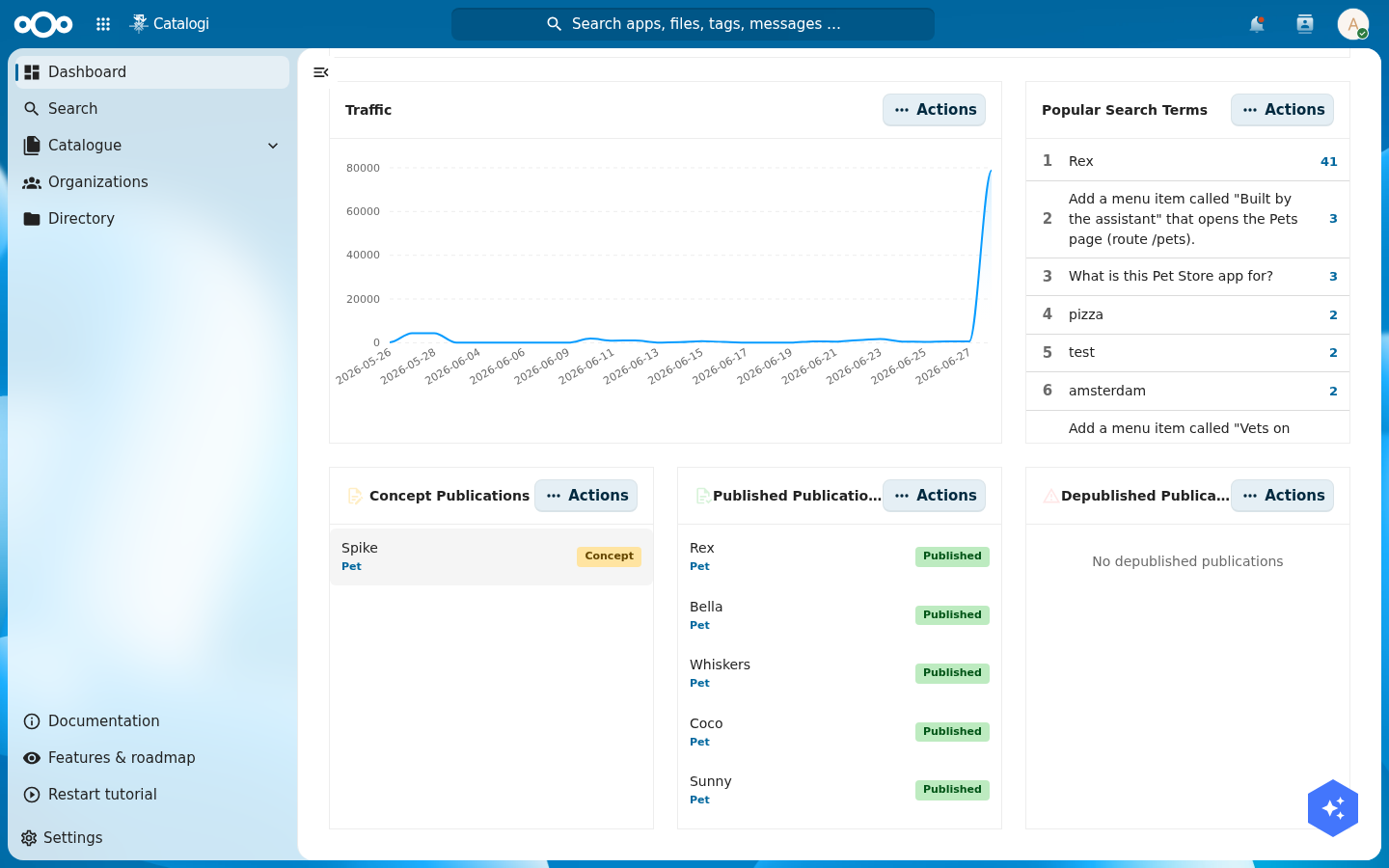
publicatiedatum.Verify: in OpenRegister an admin still sees all ten pets, while the dashboard splits them into nine published and one concept. The split is your publish rule, working.
Step 3: Verify public access anonymously
The real test is not what an admin sees — it is what a stranger sees. Read the catalog as a genuinely anonymous visitor. Each catalog is served at /api/<catalogSlug>, so the publications catalog is at /api/publications. Open it with no login (log out, or use a private/incognito window):
http://localhost:8080/index.php/apps/opencatalogi/api/publications
You get only the published pets. The future-dated Spike is absent — OpenRegister filtered it in SQL via the RBAC rule, so it never reached the response at all:
{
  "results": [
    {
      "name": "Rex",
      "species": "Dog",
      "status": "available",
      "publicatiedatum": "2026-06-01 00:00:00",
      "@self": {
        "id": "65e72185-610a-4bf2-902d-4033d9b30411",
        "register": "2414",
        "schema": "4318"
      }
    }
  ],
  "total": 9,
  "page": 1,
  "pages": 1,
  "@catalog": { "slug": "publications", "registers": ["2414"], "schemas": ["4318"] }
}
Here is that exact response in a logged-out browser — note the total of nine, and no Spike:
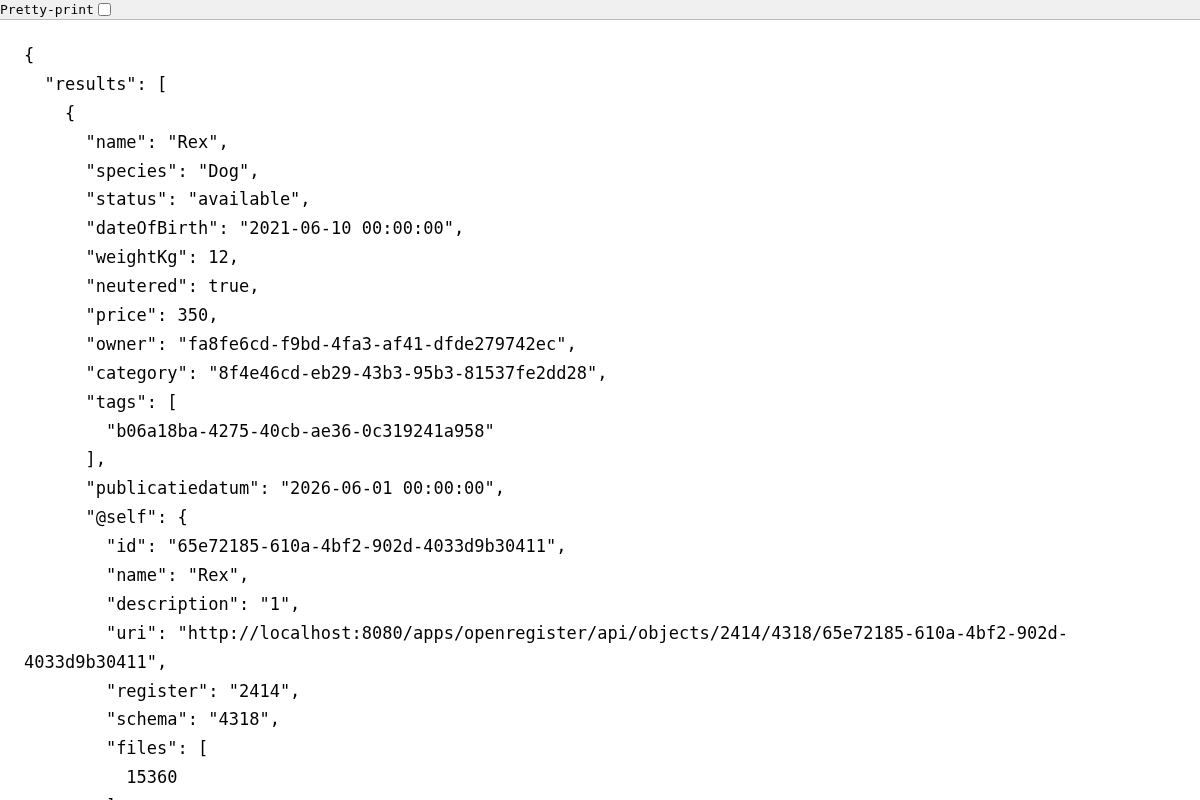
total: 9) and never the future-dated draft. The browser's own "Pretty-print" view confirms this is the raw API response, not an app page.Open the same register in OpenRegister as an admin and you see all ten pets — the difference between the two views is exactly your unpublished pet. That difference is the whole point: you did not hide a menu, you set a rule, and the rule travels with the data to every reader.
Verify: logged out, /api/publications returns nine pets and not the future-dated one. Set that pet's publicatiedatum to a past date and it appears; clear the date and it disappears again.
Step 4: Expose the catalog as a DCAT-AP-NL feed
A public API is for people and applications. Open-data harvesters speak a different language: DCAT-AP-NL, the Dutch profile of the W3C DCAT vocabulary, is the exchange format that data.overheid.nl and data.europa.eu harvest. OpenCatalogi renders your catalog as a DCAT-AP-NL document — each published object as a dcat:Dataset, each attached file as a dcat:Distribution — with no extra storage and no new schema.
Open the instance feed, anonymously:
http://localhost:8080/index.php/apps/opencatalogi/api/dcat
You get a JSON-LD document carrying the DCAT-AP-NL profile (data.overheid.nl/dcat-ap-nl/3.0) and the standard dcat/dct/foaf contexts:
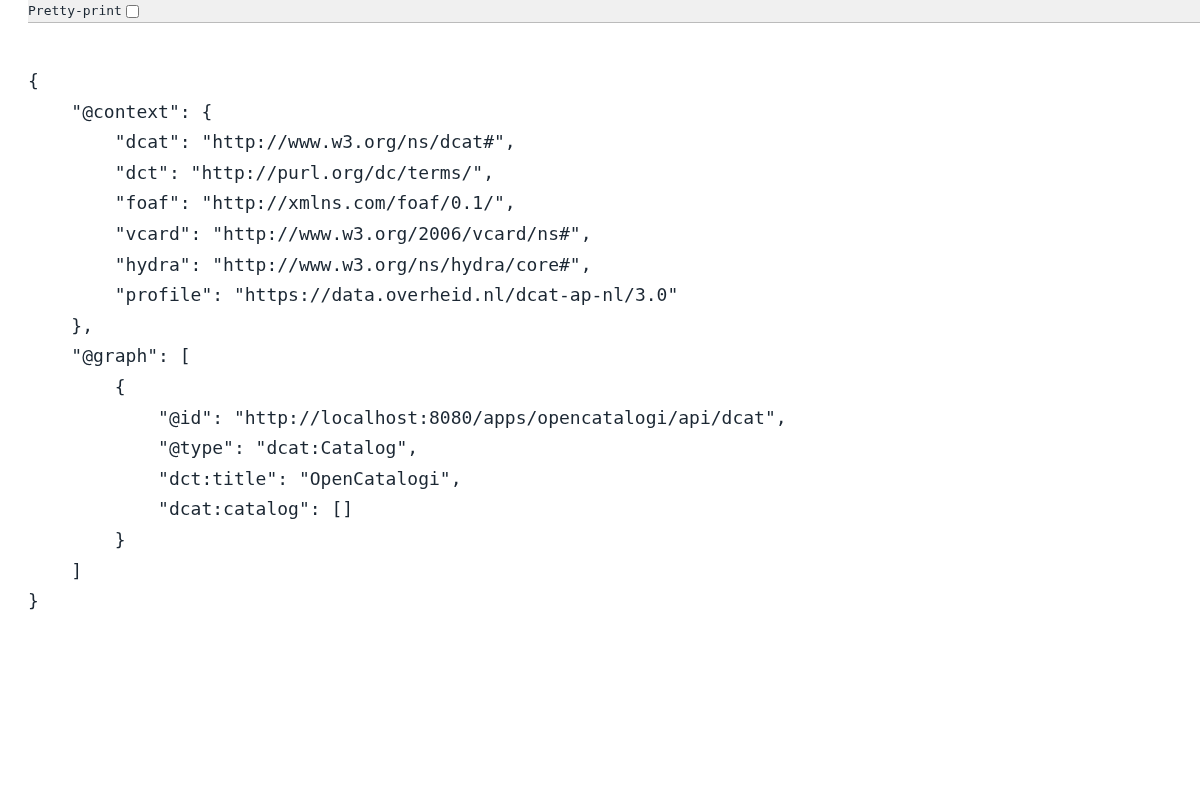
/api/dcat, anonymous. The @context carries the data.overheid.nl/dcat-ap-nl/3.0 profile and the @graph a dcat:Catalog node — the document shape a national harvester expects.A harvester points at this URL on a schedule, reads the catalog and its datasets, and lists your published pets alongside everyone else's open data. The datasets surface through the per-catalog feed at /api/catalogs/<catalogSlug>/dcat, where each published object renders as a dcat:Dataset:
{
  "@context": {
    "dcat": "http://www.w3.org/ns/dcat#",
    "dct": "http://purl.org/dc/terms/",
    "profile": "https://data.overheid.nl/dcat-ap-nl/3.0"
  },
  "@graph": [
    {
      "@type": "dcat:Dataset",
      "dct:title": "Rex",
      "dct:identifier": "65e72185-610a-4bf2-902d-4033d9b30411",
      "dcat:landingPage": { "@id": "http://localhost:8080/index.php/apps/openregister/api/objects/2414/4318/65e72185-610a-4bf2-902d-4033d9b30411" }
    }
  ]
}
The per-catalog feed honours the same visibility rule as Step 3: only objects whose publicatiedatum is at or before now appear, so a harvester never sees your drafts.
The per-catalog DCAT endpoint (/api/catalogs/<slug>/dcat) and the dataset nodes in the instance feed are gated behind a DCAT-harvesting flag on the catalog. On a catalog whose schema does not yet expose that flag, the endpoints answer "DCAT harvesting is not enabled for this catalog" and the instance feed lists the catalog but no datasets — exactly what you see above. Enable DCAT on the catalog (newer OpenCatalogi catalog schemas carry the flag) to turn the dataset nodes on. The public /api/publications API from Step 3 needs no such flag and is the endpoint to verify against first.
Verify: /api/dcat returns a JSON-LD document with the data.overheid.nl/dcat-ap-nl/3.0 profile in its @context. With DCAT harvesting enabled on the catalog, /api/catalogs/publications/dcat lists your published pets as dcat:Dataset nodes and excludes the drafts.
Troubleshooting
Troubleshooting
A pet you "published" does not appear in /api/publications. Check its publicatiedatum first. The public read rule only matches objects whose date is set and is at or before now. An empty date, or a future date, hides the object from anonymous visitors by design — that is the rule working, not a bug.
The public endpoint returns nothing at all, for every pet. Check the catalog scope. The catalog is a filter; if its registers and schemas do not include your Pet Store register and Pet schema, the catalog "contains" no pets and serves an empty list even though the data exists. Re-read /api/catalogi and confirm the scope.
Anonymous reads return 403 or nothing even with a valid publicatiedatum. Confirm the schema's read permission actually grants the public group (with the publicatiedatum ≤ $now condition). Without that public grant, OpenRegister treats the schema as readable only by named groups, and an anonymous caller is in none of them.
The per-catalog /dcat endpoint says "DCAT harvesting is not enabled for this catalog". That endpoint is gated behind a DCAT flag on the catalog. Enable DCAT harvesting on the catalog (on builds whose catalog schema exposes the flag); until then, use the instance feed at /api/dcat and the public /api/publications API.
Test yourself
You have published the catalog if all of these are true:
- The
publicationscatalog'sregistersandschemaspoint at yourpetstore-academyregister andpet-academyschema. - The
pet-academyschema's read permission grants thepublicgroup with the conditionpublicatiedatum ≤ $now, and the schema has apublicatiedatumproperty. - Nine pets carry a past
publicatiedatumand one carries a future one; OpenCatalogi's dashboard shows nine Published and one Concept. - Logged out,
/api/publicationsreturns exactly the nine published pets and not the future-dated draft. /api/dcatreturns a DCAT-AP-NL JSON-LD document carrying thedata.overheid.nl/dcat-ap-nl/3.0profile.- You can explain why publishing here is a rule on the data (RBAC + a date), not a button — and why that means an unpublished pet never leaves the database.
Where to go from here
Your Pet Store has travelled the whole pipeline: modelled in OpenRegister, filled by Integriq, and now public and harvestable through OpenCatalogi. The data you own is, on your terms, data the world can read.